Opening an OKX account in 2026: sign-up, KYC, P2P funding and your first order
OKX's sign-up form asks for several things in a row: your country of residence, an email, a phone number, an invite code, and later an ID for KYC. They're covered below in the order the page asks for them.
Opening an OKX account (formerly OKEx) takes five steps: create the account, add the invite code, pass KYC, buy USDT over P2P, place your first order. Each step says where to tap, what to enter and where people slip. The longest wait is usually the KYC review.
What's in this guide
01Is OKX the same as OKEx?
While searching you may have run into a couple of names: OKX and OKEx. They're the same exchange. OKX is the current brand name; OKEx is the older name it used before rebranding in 2022. You'll still see the old name floating around in older articles, but it's one platform.
OKX is one of the larger, mainstream crypto exchanges — it has spot trading, futures, and a Web3 wallet. As a beginner, all you really need to know is this: here you can turn ordinary money into digital currency (via peer-to-peer trading) and then buy coins like Bitcoin and Ethereum. It started out headquartered in Beijing and later moved its base offshore (it's currently registered in the Seychelles). It serves users in many countries, but not everywhere — its Risk & Compliance Disclosure lists restricted locations such as Canada, Hong Kong, Japan and India, plus certain US jurisdictions, so check that list before you sign up.
okx.com. Search results are full of lookalike and phishing sites — don't go in through some link of unknown origin. Every "Sign up" button on this site points to the official okx.com.
02What you need to sign up for OKX: email, phone, ID
No need to download a pile of stuff in advance. This is all you need:
- An email address and a phone number you can check right away — OKX verifies both during sign-up: an email code first, then an SMS code to your number (with country code).
- A strong password — letters, numbers, and symbols, and not reused from another site.
- One government-issued ID — for KYC verification. A passport, national ID card, or similar all work; the exact list is whatever the verification page shows for the country of residence you pick.
- Invite code OK2707 — you enter it during signup, and once it's bound, a share of your trading fees gets rebated back. Keep it handy so you don't forget when you get to that step.
You can register on either phone or computer. We'd suggest installing the OKX app on your phone, because the face-scan part of KYC has to be done in the app — getting it set up early makes the rest smoother.
03Step 1: Create your account
Open okx.com (or any "Sign up for OKX" button on this site) and click "Sign up" in the top right. The whole thing is just a few taps:
Pick your country of residence and accept the terms
The first screen asks for your country of residence in the Country/region field. Select where you actually live, read and acknowledge the terms of service, then select Next. Be honest here — KYC later has to match where you live, and a wrong pick will trip up your verification.
Enter your email, with invite code OK2707
Type your email in the Email address field. This is also where the referral code goes: if the referral code field is collapsed, expand it and type in OK2707, then select Sign up. More on this in the next section — it decides whether the fees on your qualifying trades come back to you at all.
Enter the six-digit code from your email
Once you select Sign up, OKX emails you a six-digit code. You have 10 minutes to enter it, then select Next. If it doesn't arrive, check spam first.
Verify your phone number
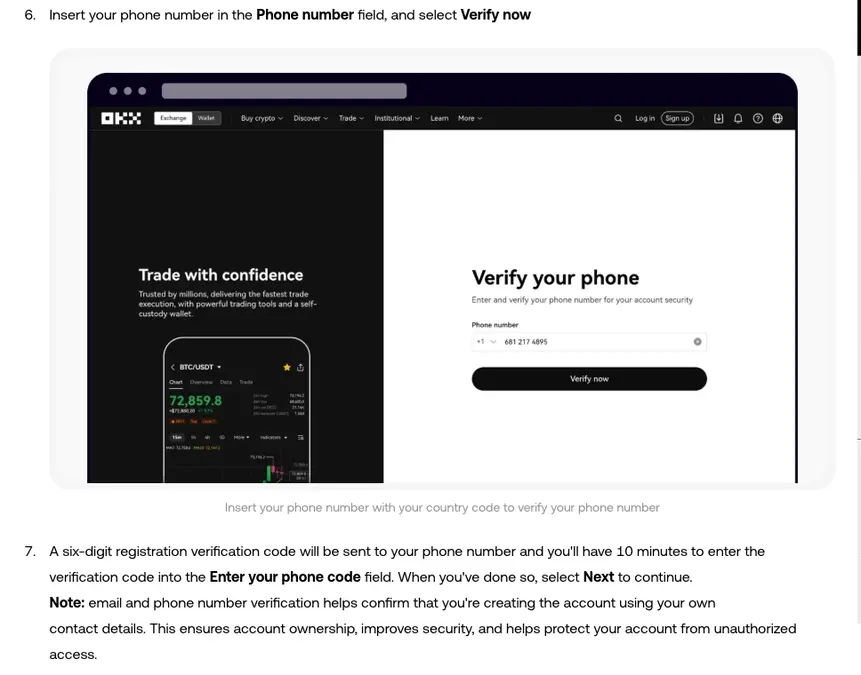
Next, enter your phone number with its country code and select Verify now. A six-digit code comes by text; enter it within 10 minutes and select Next.
Set a password and finish
Last, set your password: mix numbers, letters, symbols, and upper and lower case, and don't reuse one from another site. Once it's set you have an account, but you still can't buy or sell coins yet — the next gate is KYC.
04Step 2: Enter invite code OK2707 (don't skip this)
Ignore the invite-code field at signup and you end up paying more in fees for nothing. Here's exactly what it does:
OKX's system is to charge you the full 100% fee as usual, then rebate a portion of it back to your funding account. Once invite code OK2707 is bound, the fees on your qualifying trades are rebated automatically, with nothing extra for you to do. The rate is set by the inviter, anywhere from 0% to 20%; for invitees who have already registered it can only be raised, not lowered, so 20% is a ceiling rather than a guarantee; Broker and market-maker accounts, managed sub-accounts and trades settled with vouchers or trial funds fall outside the qualifying range. The settlement cadence follows OKX's current official program rules.
How to confirm it took effect and where to find the rebate records? We wrote a separate piece: How to enter invite code OK2707: the right way to get up to 20% off fees.
05Step 3: KYC identity verification
With the account created, you need to clear KYC (identity verification) before you can trade. An unverified account can't use most deposit, withdrawal, or trading features.
Verification is done in the app: open the OKX app → go to Menu → Account settings → under Profile, select "Identity verification". The flow is two steps: upload your ID + face scan.
What if you don't have a national ID card?
This is where people registering internationally most often get stuck. OKX KYC isn't limited to a national ID card; which documents you can use opens up based on the country of residence you picked:
| Document type | Who it's for | Notes |
|---|---|---|
| Passport | Anyone with a passport | Internationally standard; recommended first choice |
| National ID card | Anyone with a national ID | Works fine |
| Residence permit / regional travel document | Where applicable | Supported |
| Driver's license | Some countries | Supported in some regions |
Two boxes, two different rules: the region you chose at signup is where you live now (OKX says it usually isn't your nationality or passport-issuing country, so don't pick it by nationality), while the nationality in verification follows your ID. Which IDs you can use is whatever the verification page lists for your country of residence. Shoot a clear photo of the document with all four corners in frame and no glare, and do the face scan somewhere well-lit, so you are less likely to be sent back to re-upload.
To run KYC with a passport, you upload the front and back of the document plus a face scan; OKX's English Help Center says it reviews applications within 24 hours of submission. The most common reason for a rejection is glare on the document photo washing out the key details. Tip: shoot near a window in daylight, and don't use a beauty-filter camera — reshooting under better light fixes that problem.
For a more detailed breakdown by situation (how to fill in with different documents, what to do if you're rejected), see: How to pass KYC with a passport or non-standard ID.
06Step 4: Fund via P2P, buy USDT
Once you've cleared KYC, you can turn ordinary money into digital currency. A beginner's first deposit usually goes through P2P (peer-to-peer) trading: the platform matches you with a merchant who holds USDT, you pay them with your local bank transfer or card, and they release the USDT to your account. (payment methods vary by country) USDT is a stablecoin pegged 1:1 to the US dollar — think of it as your "cash" in crypto; you need it before you can buy Bitcoin and the like.
The rough path: app home → Buy crypto → P2P / Express buy → pick USDT, enter an amount, choose a payment method → confirm the order → pay using the account details the merchant gives you → tap "I've paid" after transferring → wait for the merchant to release the coins.
07Step 5: Buy your first coin, then lock down your account
With USDT in your funding account, you can buy a coin: in "Trade/Spot", pick a pair like BTC/USDT, enter the amount you want to spend, buy at market, and it fills in seconds.
Before you close the page, spend 5 minutes getting your account security right:
- Turn on an authenticator app (2FA): a rotating code on login and withdrawal cuts your theft risk dramatically.
- Set an anti-phishing code: from then on, every official OKX email will carry it; if an email doesn't, don't click any link in it.
- Withdrawal address whitelist: adds another lock on withdrawals.
Where to find these and how to set them up, in 5 minutes: Post-signup security: 2FA + anti-phishing code.